
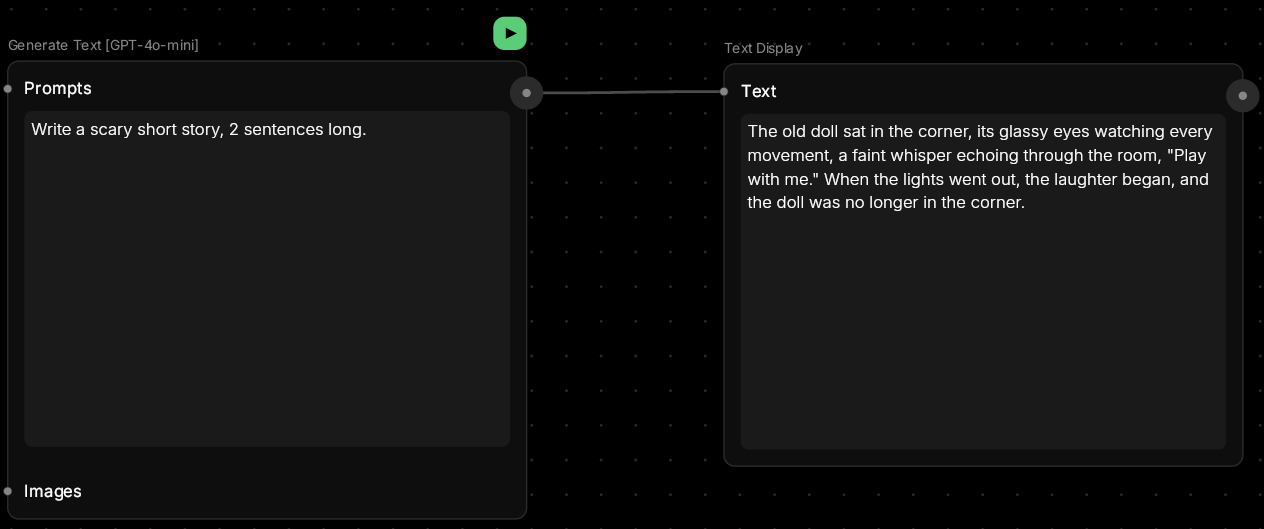
Generate Text
Turn ideas into words.This node uses AI language models (like GPT-5 or Gemini) to generate text based on your prompts. Perfect for brainstorming concepts, writing descriptions, creating dialogue, or expanding on ideas before turning them into images or videos.
🪄 When to Use It
Use Generate Text when you need to develop ideas, write copy, or create content. It works great for:- Prompt generation — create detailed image prompts from simple ideas
- Copywriting — product descriptions, captions, ad copy
- Dialogue writing — character conversations for videos
- Brainstorming — explore concepts before visualizing them
- Story development — flesh out scenes and narratives
Average time: 5–15 seconds
Cost: Very Low
🎚️ Controls and Parameters
Prompts (Array, Optional)
A series of text instructions or questions for the AI. Can be:- A single prompt: “Write a product description for eco-friendly headphones”
- Multiple prompts: Build context by chaining instructions
- Conversation: Ask follow-up questions
Images (Array, Optional)
Upload images for the AI to analyze or reference in its response. 💡 Tip: Use this to generate image descriptions, extract text from images, or get creative prompts based on visual references.🎨 Available Models
Choose the AI model that fits your task:Gemini 2.5 Pro (Default)
Google’s most capable model. Excellent for complex reasoning, long-form content, and multi-modal tasks with images. Best for:- Detailed analysis and reasoning
- Long documents and content
- Image understanding and description
Gemini 2.5 Flash
Fast and efficient variant of Gemini. Great for quick responses and simple tasks. Best for:- Rapid iterations
- Simple questions and quick answers
- Real-time content generation
GPT-5
OpenAI’s latest model. Balanced quality, creativity, and reasoning. Best for:- Creative writing and storytelling
- Balanced analysis and generation
- General-purpose tasks
GPT-4o-mini
Lightweight and fast version of GPT. Cost-effective for simple tasks. Best for:- Quick responses
- Simple text generation
- Budget-conscious projects
🎨 What to Expect
The AI will respond based on your prompt’s clarity and detail. Works best when you:- Give clear instructions
- Specify format, length, or style
- Provide context or examples
- Ask one thing at a time
- “Write a cinematic image prompt for a sci-fi city at sunset”
- “Create 3 variations of social media copy for this product image (50 characters max)”
- “Describe this image in detail, focusing on lighting and composition”
- “Write something”
- “Help me”
- “What should I do?”
💬 Quick Tips
- Be specific about what you want (format, length, style)
- Use this node to prepare prompts for other generators
- Upload images if you want the AI to reference visual content
- Chain multiple Generate Text nodes to build complex ideas
- Different AI models have different strengths:
- Gemini 2.5 Pro — best for complex reasoning and long content
- Gemini 2.5 Flash — fastest for quick responses
- GPT-5 — balanced quality and creativity
- GPT-4o-mini — lightweight and fast for simple tasks