Text to Video
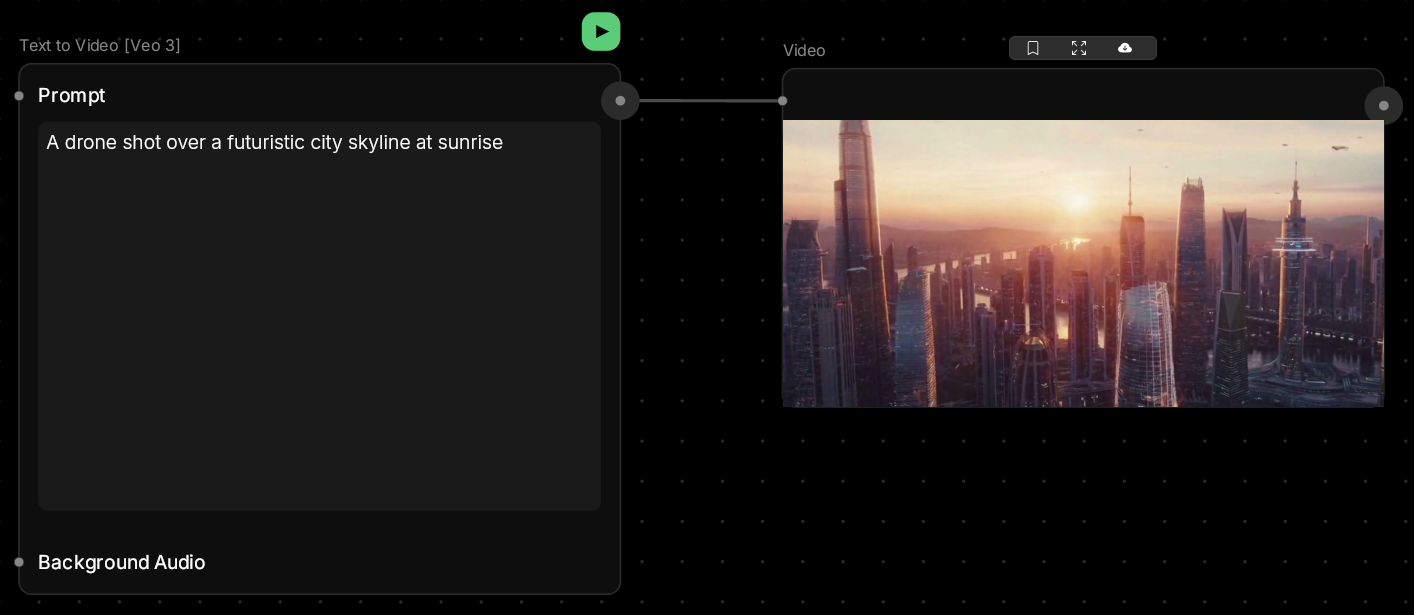
Bring motion to your ideas without filming anything.This node creates short video clips from text descriptions — perfect for visualizing concepts, testing storyboards, or creating unique content for social media.
🪄 When to Use It
Use Text to Video when you need motion but don’t have footage to start from. It works great for:- Concept visualization — see your scene ideas in motion
- Storyboard testing — explore camera moves and pacing
- Social content — eye-catching clips for feeds and stories
- Creative exploration — experiment with movement and transitions
Average time: 45–90 seconds per clip
Cost: High
🎚️ Controls and Parameters
Prompt (Text, Required)
Describe the scene and motion you want. Include camera movement, subject actions, and atmosphere. 💡 Tip: “A drone shot rising over a futuristic city skyline at sunrise, camera moving slowly forward” works better than just “city.”Background Audio (Audio, Optional)
Add a soundtrack or ambient audio to accompany your video.Duration (Select)
Choose clip length:- 4 seconds — quick moments, fast generation
- 6 seconds — balanced length for most uses
- 8 seconds — longer scenes, cinematic shots
Resolution (Select)
- 720p — faster generation, good for previews
- 1080p — higher quality for final output
Aspect Ratio (Select)
- 16:9 — landscape (YouTube, web)
- 9:16 — portrait (TikTok, Instagram Stories)
Generate Audio (Toggle)
Automatically create ambient sound effects that match your scene. 💡 Tip: Enable this for atmospheric clips, disable if you’re adding custom audio later.🎨 Available Models
Different models offer varying quality, speed, and features:Veo 3 (Default)
Google’s latest video model. High quality with excellent motion coherence and natural audio generation.Wan2.5
Flexible model supporting multiple aspect ratios (16:9, 9:16, 1:1) and resolutions up to 1080p. Great for social media content.Kling 2.5 Turbo
Fast generation with good quality. Ideal for quick iterations and preview work.Sora 2
OpenAI’s standard video model. Reliable quality with landscape and portrait support.Sora 2 [Pro]
Enhanced Sora variant with higher resolution options and better detail preservation. 💡 Tip: Start with Veo 3 for best quality. Use Kling Turbo when you need fast iterations.🎨 What to Expect
Video generation is more complex than images — expect variation in quality.Motion tends to work best with:
- Smooth camera movements (pans, dollies, fly-throughs)
- Simple subject actions (walking, turning, flowing water)
- Atmospheric scenes (clouds moving, light shifting)
- Complex character interactions
- Fast, jerky movements
- Multiple subjects doing different things
💬 Quick Tips
- Describe camera movement explicitly (“camera pans left,” “dolly zoom out”)
- Simpler prompts often work better than complex ones
- Start with 720p to test your idea before generating in 1080p
- Negative prompts help avoid unwanted effects (“no blur, no distortion”)
- Try multiple generations — video results vary more than images